
Seagate One Touch 4TB: 30-second review
The Seagate One Touch 4TB is a relatively nondescript-looking portable HDD which is bus-powered directly through the USB-C data cable. The drive is relatively compact and slips easily into a laptop bag or pocket, making it highly portable. Whilst the exterior casing is mid-grey plastic, it’s nicely finished and feels robust. This portable drive features an HDD rather than an SSD, which does make this drive cheaper than some of the latest ultrafast drives I’ve looked at recently. Even so, at £179/US$199 at the time of writing this review, it’s still relatively expensive. For that money, you get the drive itself and a short 50cm USB-C cable to connect it to your machine. Getting started is easy: the drive comes formatted in exFAT, so it’s easily recognised on Mac, PC, and Linux systems. Opening on either iOS or Windows machines reveals free software that guides you through initial registration, downloads the Security Toolkit, and highlights partner deals Seagate has set up with Adobe, Synology, and Mylio. In this review, I’ve downloaded and installed the Toolkit, which is basically split into two parts. It includes a backup feature, which lets you choose different backup options for your computer and drive, and a security option, which lets you add a password and encrypt the drive’s contents. Alongside those software options, there are also partner deals, and all offer a limited trial period before you have to move to a full subscription. However, the Synology Deep Search is well worth mentioning. Whilst you only get six months of free use before needing to pay, if you need to manage multiple files and have a search feature driven by AI that is far better than your standard search options, especially on a Mac, then this really might be of interest. As a standard portable HDD, the 4TB capacity is perfect if you work with media files and need space for HD and 4K video. Whilst HDD technology limits speed, the benchmarking tests still showed impressive transfer rates, reaching over 140MB/s in some tests for both read and write. That transfer speed let me edit 4K footage shot on the GoPro Mission 1 ILS directly from the drive in Final Cut Pro X, and while the machine and drive occasionally had to catch up, editing a five-minute production was extremely smooth. Its real strength, however, is securely backing up your laptop or desktop data, and the included Toolkit software lets you run through a series of setup options with easy-to-follow prompts that work on both Mac and PC. Unlike many HDD and SSD portable drives that offer software encryption, this drive offers hardware AES 256-bit encryption that is managed through the Seagate Toolkit software. For my money, that makes it one of the best external hard drives for security. Through that software, you can encrypt the drive with a password lock. Because this security is hardware-based rather than software, it also meant that, through the benchmarking, when I tested the drive before and after the hardware encryption had been activated, the performance difference was minimal. It’s obvious from the aesthetics and material choices that this is a mid-range portable HDD, but the tests impressed me with its performance and overall quality. I’d definitely recommend it if you’re looking for a middle-of-the-road, no-frills, high-capacity HDD for general storage and backup, with the real value here being the Toolkit included with the drive. Seagate One Touch 4TB: Price and availability
How much does it cost? From £95
When is it out? Available now
Where can you get it? Directly from Seagate and online retailers. At present, the Seagate One Touch portable HDD is available in two different capacities – 2TB and 4TB, which retail for $160 and $200 respectively. In the UK, it’s priced at £112 and £176. You can buy it direct from the Seagate website , where you’ll also find a list of all stockists, which includes most major main online retailers. It comes in three colors: blue, grey, and white. Value: 5 / 5
(Image credit: Alastair Jennings) Seagate One Touch 4TB: Specs
Drive Type: Portable external HDD
Storage Capacity: 2TB or 4TB
Interface: USB-C
Power: USB-powered, no external adapter required
Dimensions (2TB): 117 × 81 × 14mm
Weight (2TB): 156g
Compatibility: Windows and macOS
Security: Password protection and hardware encryption
Backup Software: Seagate Toolkit
Seagate One Touch 4TB: Design
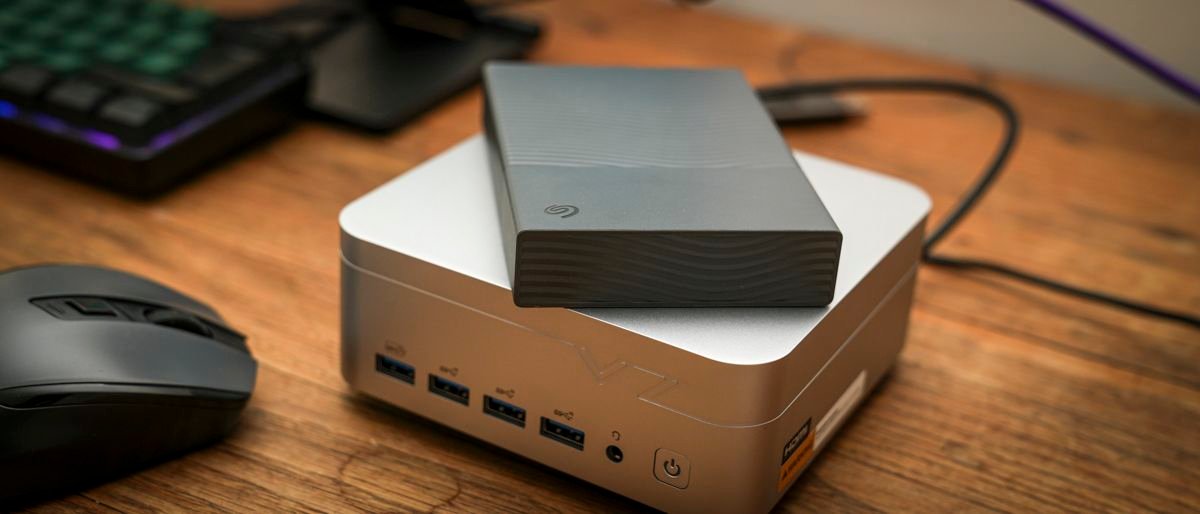
Lifting the drive from the box, and the 4TB version I’m looking at feels nice and tactile, with a wave surface texture that adds a little interest to the mid-grey colouring. The full build is plastic, yet it feels decent enough, with a single USB-C port at the back and, thankfully, a small white indicator LED right next to it. In terms of size and weight, it’s just a little larger than the compact 2. 5-inch laptop-style HDD inside, with the casing measuring 115. 3 × 80 × 20. 9mm. The 4TB version I’ve looked at in this review weighs 268g. The USB-C cable is a bit longer than the ones I’ve seen with some other portable drives recently, measuring 50cm, which gives good reach to a desktop mini PC or laptop, depending on what you’re using. (Image credit: Alastair Jennings) Whilst the One Touch name initially suggests fingerprint security, it actually refers to the company’s product line that offers one-click backup for your files. It also offers automatic backup folder mirroring and is plug-and-play, so the name really reflects how simple the drive is to use. Alongside the hardware comes a software suite, with installers on the drive’s root that you can run once you plug it in. The drive comes pre-formatted in exFAT, but you can reformat it to match your native OS, Mac or PC. The software installer lets you install the files you need for the more advanced backup and security features, and I liked how streamlined the installation process was, with it guiding you through the initial setup step by step. Design: 4 / 5
(Image credit: Alastair Jennings) Seagate One Touch 4TB: Features
The Seagate One Touch portable external hard drive is sold by the company as a premium portable, on-the-go backup solution, designed to be used equally in the home or out and about. This high-capacity portable hard drive comes with software options ready to install. These let you back up and secure your files, while software partnerships offer extended trial periods for apps to help you manage and organise files on the drive and on your host machine. The drive is available in three colour options: dark blue, space grey, and white. It’s also provided with a long USB-C cable, at 50cm, that runs from the drive to your host machine. This means your machine needs a USB-C port to work with this drive. The drive comes with bundled software, including the Seagate Toolkit, which requires registration but no other subscription costs. There’s also a two-month trial of Adobe Creative Cloud Pro, and six-month trials of Mylio and Synology Deep Search. You also get the superb Seagate Rescue Data Recovery Service. If the worst happens to your files, you can send the drive to Seagate, and they will see if they can recover anything that still exists. While this drive can be used as a portable working drive, Seagate has marketed this as a portable backup solution, and as such, it doesn’t highlight the transfer rate. However, with USB 3. 2 Gen 1, essentially USB 3, you can expect a maximum theoretical bandwidth of 5Gbps, 625MB/s. However, since this contains an HDD, we can expect transfer rates between 120 and 150MB/s, which suggests Seagate matched the internal hardware and USB interface to maximise performance for its intended use as a portable backup rather than a working drive…