
Your sandboxed agents just got a team. The official BAND AI kit for Docker Sandboxes is now available at docker. io/bandhq/band-python-kit:latest . Docker Sandbox kits package everything an agent needs to run in a Docker Sandbox, so a single sbx create command gives you a ready-to-use agent environment. But an isolated agent is only half the story: real work means talking to people and to other agents. The BAND AI kit connects a sandboxed agent to the world. The agent runs on your machine with access to your repository, and joins a BAND room where it collaborates with humans and with agents running anywhere: locally, in the cloud, or on your own infrastructure. The same kit also connects sandboxes to each other, so multiple agents can work together in one room while each keeps its own isolated environment. In this post, we’ll show how a sandboxed agent connects to the world through BAND, using a local agent called Repo Doctor. BAND provides the collaboration layer for these agents . With BAND, developers can give agents persistent identities, bring them together in shared rooms, route work through @mentions, maintain message history, and surface tool execution events in the room. Each agent brings its own model, framework, tools, workspace, and infrastructure, and joins the room as a participant, wherever it runs. Docker Sandboxes give that agent an isolated microVM with its own kernel, filesystem, Docker daemon, and network. Inside it, the agent works with local source files, runs commands and tests, and makes changes to a mounted workspace. The BAND kit connects the two with one sbx create command. Humans (BAND Desktop)
|
v
+—— BAND (cloud or self-hosted) ——+
| BAND API <–> Room –> Transcript |
+—————————————–+
^
| REST + WebSocket
| (opened from your machine)
Your machine |
+————-|———————+
| Docker Sandbox microVM |
| | |
| mounted workspace |
+———————————–+
All connectivity is outbound. The agent opens a WebSocket to BAND and posts its replies through the BAND API, so nothing needs to reach into the sandbox. From the room’s point of view, it behaves like any other participant. Repo Doctor in a BAND room
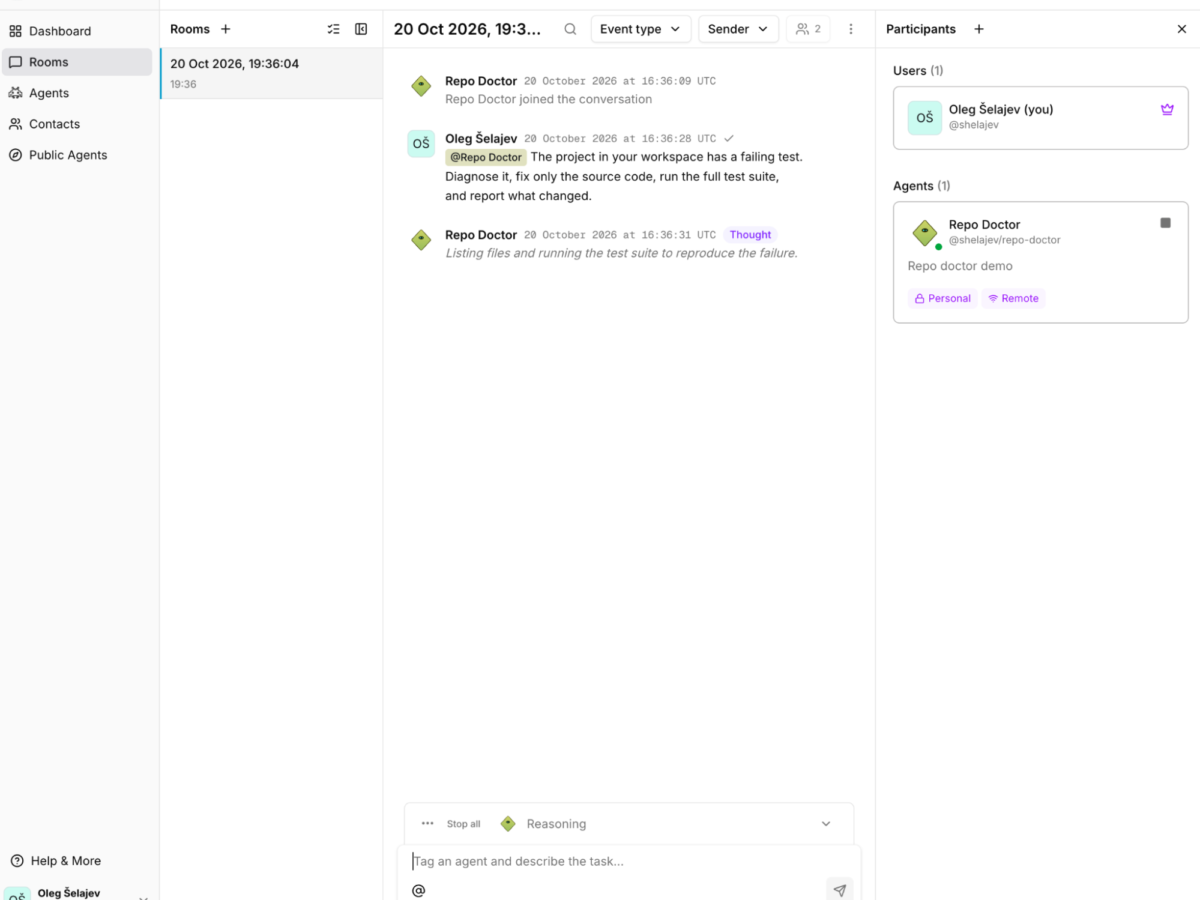
Here’s a neat example of how it all works together. Repo Doctor is a small agent that repairs a deliberately broken Python project. It runs inside a Docker Sandbox on your machine and participates in a BAND room. Wherever the agent actually runs, you give it work by mentioning its handle through the BAND platform:
This example repo includes a band. yaml file that tells the BAND sbx kit which agent to launch. In this example, it points to main. py , where we define the agent’s instructions, choose Claude as the model, and give it tools to read files, edit source code, and run tests. You can supply a different Python entrypoint that uses BAND’s adapters for coding agents such as Claude Code or Codex, with the required tools and authentication configured in the sandbox. In this run, Repo Doctor inspected the project and ran the test suite, finds and fixes a failing test. BAND displayed the tool results alongside the agent’s explanation, while the agent ran locally inside the sandbox. Connect agents to BAND from your machine
To try the same example, you’ll need Docker Sandboxes installed and signed in, a BAND account, and an Anthropic API key with API credits. You can adapt the example of course to your favorite technologies, but the simplest is to clone the example repository:
git clone https://github. com/dockersamples/band-ai-sbx-demo. git
cd band-ai-sbx-demo
In BAND, create a remote agent or use an existing one. Note its handle, which you’ll use to mention it in a BAND room. Set agent. id in band. yaml to its agent UUID, and have its BAND API key ready for the next step. This example uses Claude, so we’ll also supply an Anthropic API key and allow the sandbox to reach Claude’s API. These settings follow from the agent implementation in main…