Khadas Mind Pro: 30-second review
Having reviewed the Khadas Mind 2S just over a year ago, I was impressed by just how much processing power Khadas had managed to squeeze into such a small machine. Now, with the arrival of the Mind Pro, the company has retained much the same compact form factor and innovative modular design, while introducing Intel’s latest Core Ultra processor and Arc integrated graphics. The result is an exceptionally powerful mini PC that feels just as capable as many considerably larger desktop systems, especially when it comes to everyday productivity as well as creative applications. It once again features the premium metal construction, and with dimensions of just 146 × 105 × 28mm, it’s small enough to slip into a bag and carry between home and office. What makes this particularly useful is the integrated 7. 98Wh standby battery, which allows the machine to maintain your Windows session while moving between those locations, much the same as using a laptop. During testing, I was able to leave applications open, disconnect the computer, throw the Khadas Mind Pro in my backpack and travel home. Then I was able to reconnect to a monitor, mouse and keyboard at home and continue the session without needing to re-open applications and work. This is what we have come to expect from laptops, but not with a Mini PC, and it’s a surprisingly useful feature, boosted by the option of extras such as the Dock and GPU modules. Performance is equally impressive as it features an Intel Core Ultra X7 358H, combined with 64GB of RAM and integrated Arc B390 graphics. This combination proved to handle Microsoft Office, Photoshop and Lightroom extremely well. Even Adobe Premiere Pro and DaVinci Resolve proved more usable than I had anticipated with 4K footage shot on the GoPro Mission 1 ILS. Gaming was another surprise, with Cyberpunk 2077 and Indiana Jones and the Great Circle both running at medium-quality settings; although as I extended play there were occasional frame drops, there was nothing too much to impact gameplay. The other point here was that the fans kicked in and, while audible, they remained relatively quiet. The machine also has considerable AI potential, with a dedicated NPU and 64GB of shared memory. My initial CPU-based Lemonade AI testing showed that it could handle practical local AI tasks, although switching between models wasn’t always straightforward. Using the dedicated NPU with the right models gained some impressive results, but again selecting the right LLM manager and model takes some time, this process took me from Lemonade to the LM Studio. Through the test, my main issue with the machine was the connectivity. With only two Thunderbolt 4 ports, it’s easy to run out of high-speed connections when using a USB-C monitor, power supply and external storage. If you are using the Mind Pro as your main desktop, this is where the optional Mind Dock starts to make sense and is more like an essential purchase. Ultimately, the Mind Pro is an impressive example of innovation and how far mini PCs have progressed. It won’t be the best mini PC for most users. It isn’t cheap, and you’ll need to invest further to see the full potential of its modular design, but the impressive processing power, portability and modular extras make it expensive but very desirable. Khadas Mind Pro: Price and availability
How much does it cost? From $2,559
When is it out? Available now
Where can you get it? Directly from Khadas
The Khadas Mind Pro costs $2,599 for the Core Ultra X7 358H, 64GB RAM and 2TB SSD configuration that I’ve looked at in this review and is available directly from Khadas. Alongside the Mini PC, you can also purchase the optional Mind Dock, Mind xPlay and Mind Graphics 2, although these will add considerably to the overall cost. Value: 4 / 5
(Image credit: Alastair Jennings) Khadas Mind Pro: Specs
CPU: Intel Core Ultra X7 358H, 16 cores / 16 threads
Graphics: Intel Arc B390 integrated graphics
NPU: Intel AI Boost NPU 5, up to 50 TOPS
RAM: 64GB LPDDR5X, 8533MT/s
Storage: 2TB PCIe 4. 0 M. 2 2230 SSD
Additional storage: M. 2 2230 NVMe expansion slot
Rear Ports: 2 x Thunderbolt 4, 2× USB-A 3. 2 Gen 2, HDMI 2. 1 FRL
Expansion: Khadas Mind Link proprietary modular interface
Connectivity: Wi-Fi 7, Bluetooth 6. 0
Audio: Audio output via supported display, USB and compatible expansion accessories. Battery: 7. 98Wh internal standby battery
Dimensions: 146 × 105 × 28mm
Weight: 562g
Operating System: Windows 11 Home
Power: 100W USB-C power adapter
Optional Accessories: Mind Dock, Mind xPlay and Mind Graphics 2
Khadas Mind Pro: Design
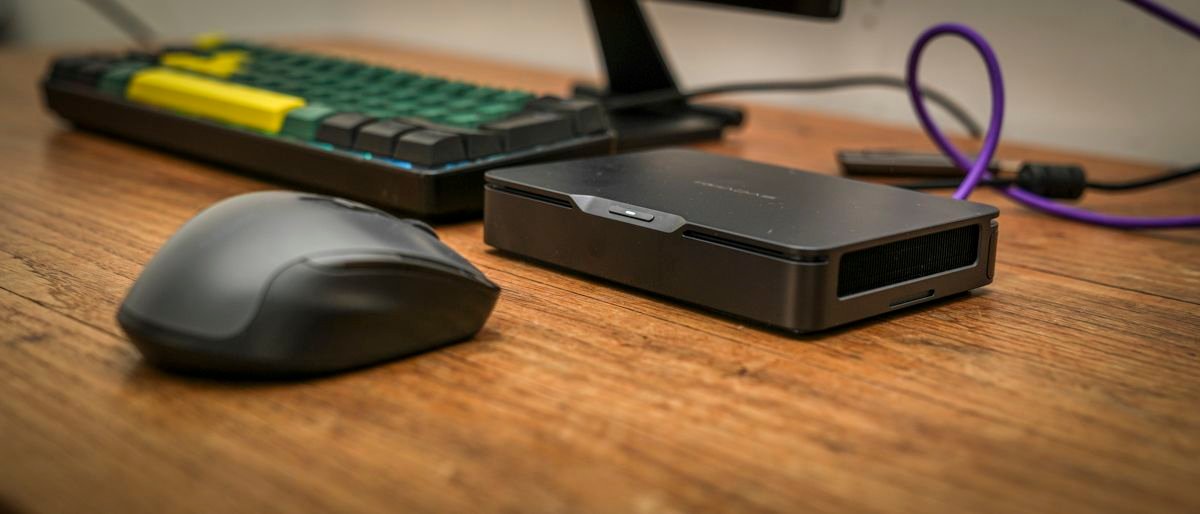
Unpacking the compact AX9 Max, the metal casing and detailed plastic base of this mini PC instantly reinforced its price point. Only after carefully checking the detailing and the large, shiny logo on top did I start to question whether this was a premium machine or just one trying to look premium. Checking the specifications and that the price point was justified, but there’s still something about the design that feels a little over the top. The rest of the design is solid, and at 134. 9 × 131. 8 × 57. 7mm and 777. 5g, it’s a great size and weight for this style of machine. Around the casing, there are four USB 3. 2 Gen 2 Type-A ports and a 3. 5mm stereo headphone jack. On the left side of the casing is an SD 4. 0 memory card slot, while the back has two USB4 Type-C ports, a USB 2. 0 port, two HDMI 2. 1 ports, two 2. 5Gb RJ45 sockets, a USB 3. 2 Gen 2 Type-A port, and the DC-in port. (Image credit: Alastair Jennings) Having reviewed the Khadas Mind 2S just over a year ago, I was impressed by the combination of its exceptionally small size, processing power and innovative modular design. With the arrival of the Mind Pro, it’s immediately apparent that the company has retained much of the ethos of those initial machines and what made them so interesting. The form factor is familiar, the design remains incredibly minimalist, and once again, it’s the modular expansion ecosystem that differentiates this from the usual mini PCs I look at. The first impression is that this is an exceptionally well-made and small mini PC. The metal casing gives it a premium feel, with solid construction, and it’s just understated when it comes to styling, which I really like. The front just features the power button mounted into a subtle cutaway, and all connectivity options are lined up at the rear. The compact dimensions are great if you have limited desk space or you need to take the machine between locations. This portability is one of the key features and, like a laptop that enables you to close the lid without powering down, the Mind Pro enable you to do much the same when you move from one location to another. Simply unplug the monitor, keyboard and mouse, and pop it in your bag; then, when you get to the next location, connect up and off you go. All the apps and work that you were working on will still be there and ready for you to continue with. The idea behind the machine is that you have the core, which is the Mind Pro, then you have the accessories, so in the office where you need to focus on high-demand work, you’ll have the Mind Graphics 2 eGPU Module and Mind Dock All-In-One Docking Station. While at home, where you may just want to check email and do some light work, you may just need the Mind xPlay Portable Display + Keyboard, which will, in low-power mode, essentially give you the same abilities as a Windows Home laptop. You can also plug in the Tone2 for audio. The point is the Mind Pro is just the core, and how and where you use it will dictate what additional extras you want and need. What makes the portability possible is the integrated 7. 98Wh standby battery. This isn’t designed primarily to power the machine in the same way as a laptop battery and instead is used to maintain the machine’s working state when disconnected from external power. Taking a look at the limited ports on the back, there are two Thunderbolt 4 ports, an HDMI 2. 1 connection and two USB-A 3. 2 Gen 2 ports. While this matches most premium laptops, I found that the two Thunderbolt connections became a bit of an issue, particularly when using the Mind Pro for creative work. With a Thunderbolt monitor and power connected, there was no fast connection left for connecting high-speed external SSDs or card readers without using an additional adapter. The two USB-A connections are useful, but their 10Gbps maximum transfer rate is far slower than the Thunderbolt 4’s 40Gbps connection bandwidth. Considering the performance on offer here, a third Thunderbolt connection would have been welcome. For anyone intending to use the Mind Pro as their main desktop computer, the Mind Dock is essential, and at $199, that’s quite an additional cost on an already expensive machine. The all-metal construction does make the Mind Pro look like it should be passively cooled. However, there is an active cooling system inside, and while the fans become audible on many of the more demanding tasks, I was generally well controlled. During intensive creative work, the casing also became warm to the touch, which isn’t particularly surprising given the amount of processing power packed into such a small space. The design of this small machine is stunning, and the portability of the design with the integrated standby battery is actually a great idea. However, when it comes to the design, the limited port selection is frustrating, especially at this price, but it has been designed to be used as a modular setup, and the dock and GPU are available to boost the performance further at a cost. Design: 5 / 5
(Image credit: Alastair Jennings) Khadas Mind Pro: Features
The Khadas Mind Pro builds on the modular design of the machines that I have looked at in the past from the company and combines powerful processing with a proprietary expansion interface and an integrated standby battery. At the heart of the system is Intel’s Core Ultra X7 358H, a 16-core processor supported by Intel Arc B390 integrated graphics and a dedicated AI Boost NPU. In this review, I have looked at the standard Pro machine with 64GB of LPDDR5X memory and a 2TB PCIe 4. 0 SSD. While those specifications are impressive, what separates this from most other mini PCs is that it has been designed so that the Mind Pro can easily move between different work and home environments, with a range of Mind Link connection expansion modules that adapt its use depending on your needs. These modules include the Mind Dock that provides additional connectivity for when it’s used as a desktop workstation, and this comes in at around $200. Then there’s the Mind xPlay portable display at $99, or with keyboard at $399, which offers a more mobile configuration. There’s also the Mind Graphics 2 that adds dedicated graphics processing for creative applications, gaming and potentially supported AI workloads, and this will set you back a further $1449. Unfortunately, none of these modules was available during my testing, so I wasn’t able to assess the complete ecosystem. Even without the expansion options, however, the Mind Pro has plenty of raw processing power. The internal 7. 98Wh battery is the most unique, and as I found this on a normal working day when I regularly travel between office, home and college, with a journey time that can vary from ten minutes up to an hour and a half. With a conventional mini PC, that would mean saving everything, closing applications and shutting down before leaving, then re-opening everything when I get to my next destination. Which is one of the reasons I use a laptop, as I can keep everything open; however, the laptop isn’t light. With the Mind Pro, I could simply disconnect the power, place the machine in my backpack and reconnect it at the other end, just like a laptop, just minus the screen, keyboard, and trackpad. Throughout testing, this worked exceptionally well. I could leave Adobe Premiere Pro and other applications open, move between locations and return to the same Windows session without having to reopen everything. It certainly makes for a lightweight alternative, although the internal 2TB SSD provides plenty of space for applications and smaller projects; I generally edit video from external storage. This makes the portable workflow slightly more complicated, as unplugging an external SSD while Premiere Pro is accessing footage isn’t particularly advisable, but then that’s the same on a laptop. For shorter productions, however, the system really comes into its own. During testing, I was editing approximately five-minute videos using footage from the GoPro Mission One, with the files stored directly on the internal SSD. This enabled me to start editing at the office, disconnect the computer and finish the project at home without closing Premiere Pro or shutting down Windows. The battery also allows the Mind Pro to operate independently of external power for short periods, although this is very much a secondary feature. Using the Khadas Mind app, it’s possible to select the Use Battery option under Device Mode When Unplugged, allowing the computer to continue operating instead of immediately entering a standby state…