
At a glance: Acer Googlebook 14
What is it? The Acer Googlebook 14 is one of the first Googlebook devices on the market. Unlike budget Chromebooks , Googlebooks are premium laptops that run Googlebook OS, an operating system based on Android, and Acer’s model is the most affordable variant and the only one that currently offers a 2-in-1 form factor. What does it cost? Googlebooks aren’t budget devices like Chromebooks — they come with premium price tags. That said, the Acer Googlebook 14 is the cheapest model you can get right now, starting at $899 / £999 (around AU$1,300). This entry-level model comes with an Intel Core Ultra 5 Series 3 processor, a 14-inch OLED screen, and 16GB RAM, and in some markets, you can also get it with a more powerful Intel Core Ultra 7 processor. Alternatives
The Acer Googlebook 14 launches alongside four other Googlebooks: the Asus Googlebook 14, HP Googlebook 14, Lenovo Googlebook 15, and the Dell XPS Googlebook. These laptops all have superficially similar specs, such as starting with 16GB of RAM and 512GB storage, but each one has a different selling point, be it a larger screen, thinner design, or, in the Acer Googlebook 14’s case, a 2-in-1 design. Acer Googlebook 14 scorecard
How the Acer Googlebook 14 scored in our review
Value
4
Design
4
Performance
3. 5
Battery life
3
Overall
4
Group 1 Data Product Value () Design () Performance () Battery life () Overall () Acer Googlebook 14 4 4 3. 5 3 4
Acer Googlebook 14 review: Value for money
Starting at $899 / £999 (around AU$1,300), the Acer Googlebook 14 is the most affordable Googlebook in the initial lineup, with the Dell XPS Googlebook ($999 / $1,099 / $2,399) next. It’s around $200 / £200 cheaper than the HP Googlebook 14 and Asus Googlebook 14, the two most expensive Googlebooks. The fact that the Acer Googlebook 14 is a 2-in-1 device, whereas the more expensive Googlebooks are simply traditional laptops, makes it, in my view, an even better value. The Acer Googlebook 14, as with all other Googlebooks, gives you 12 months of Google AI Pro (worth $249. 99 / £220 / around AU$480), plus three months of YouTube Premium and a year of GeForce Now game streaming. In the UK, Acer is also offering, for ‘a limited launch window’, an Acer Mega-Hardware Pack worth £144. 96 which includes a compact 100W fast charger, 5-in-1 USB-C hub, Acer wireless mouse, three-year warranty — and it’ll plant 10 trees in the buyer’s name — a nice nod to Acer’s admirable focus on sustainability. This deal was supposed to end on October 19, 2026, but I have been informed by Acer that it’s been extended until the end of November. This helps make the Acer Googlebook 14 an even better value, and I’ve asked Acer if similar bundles are being offered in the US, and will update this review when I hear back (the Acer Googlebook 14 isn’t currently on sale in Australia, which is a shame). While the Acer Googlebook 14 is quite a bit more expensive than most Chromebooks, it’s a premium device with a gorgeous design and some powerful hardware, which does justify the higher price, somewhat. However, if money is tight, then a budget Chromebook will be a better buy. View Deal
Acer Googlebook 14 review: Design
Only 2-in-1 Googlebook (so far)
Sleek, premium design
Lovely screen
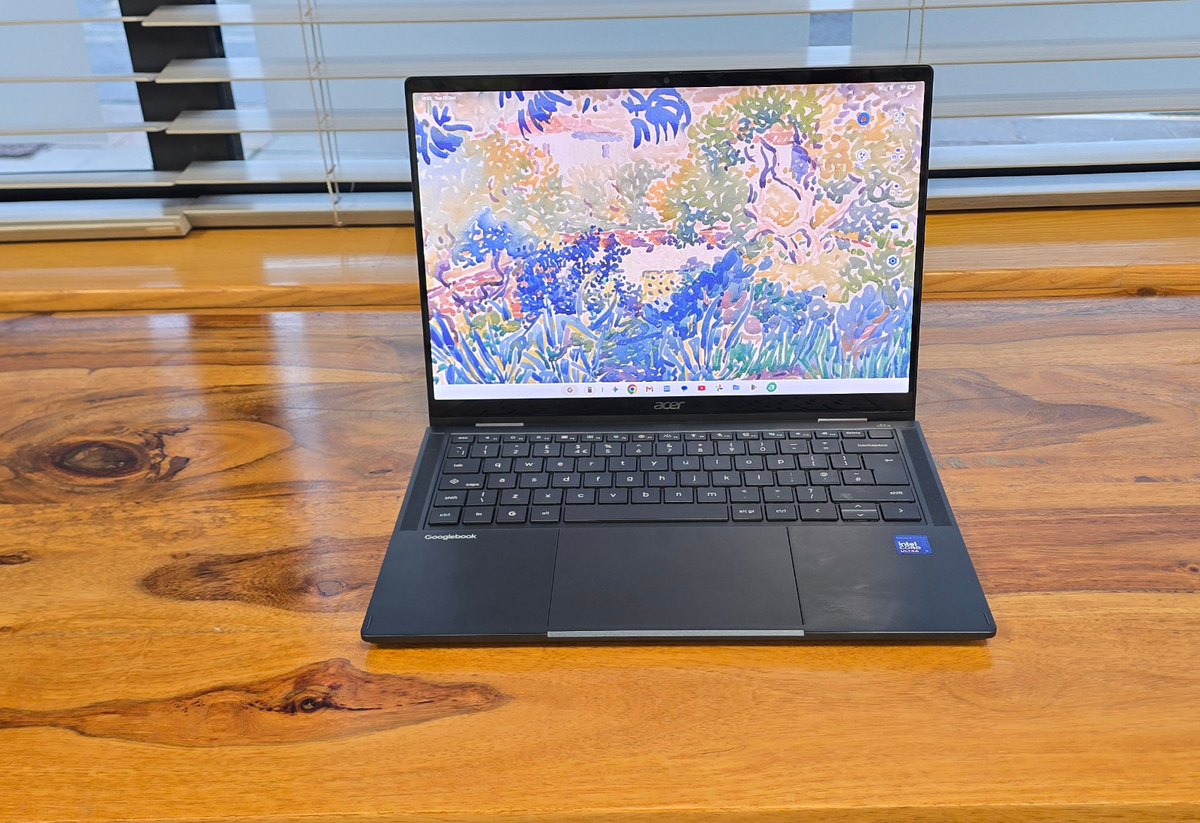
When Google announced the first batch of Googlebooks, the company made it clear that these are premium laptops with designs to match. So, don’t think of the likes of the Acer Googlebook 14 as replacements for cheap and cheerful Chromebooks, but instead rivals to the MacBook Air, as well as Windows 11-powered ultrabooks . That’ll be a disappointment to anyone who was hoping Googlebooks would be more affordable — perhaps rivalling the MacBook Neo when it comes to value for money. However, the Acer Googlebook 14 does look and feel like an expensive laptop, which goes some way to justifying the price. With dimensions of 12. 28 x 8. 78 x 0. 55 inches (312 x 222. 9 x 13. 9 mm), it’s slightly chunkier than the MacBook Air 13-inch (M5) , though it comes with a slightly larger screen. It’s noticeably lighter than Apple’s laptop, weighing 2. 51 lbs (1. 14 kg), compared to the MacBook Air’s 2. 7 lbs (1. 24 kg). 1
2
3
Finger print scanner
The power button includes a finger print scanner for biometric login. 360-degree hinges
The hinges allow the screen of the Acer Googlebook 14 to flip back, turning it into a tablet-like device. Keyboard
The keys are large and comfortable to type on. Side view of the Acer Googlebook 14
Explore
It’s the second lightest Googlebook, only beaten by the Asus Googlebook 14, which weighs in at just 2. 2 lbs (1 kg). The body of the laptop uses a magnesium-aluminium alloy, which feels robust without being too heavy, so while the Acer Googlebook 14 feels thin and light, it also feels durable. You certainly wouldn’t feel worried about damaging it when taking it out and about with you. While it’s not the lightest laptop I’ve ever tested, it feels comfortable to hold in one hand, and shouldn’t hurt your back if you’re carrying it around. The thin design does come with some drawbacks, namely with the port selection — you just get three USB-C ports and an audio jack. One of the USB-C ports is Thunderbolt 4, while the other two are slower USB 3. 2 Gen 2 ports, so that means you’ll want to pay attention to which port you plug things into, especially if transfer speeds are particularly important. To Acer’s credit, three USB-C ports are an improvement on the two ports a lot of similarly-priced thin and light laptops offer (such as the aforementioned MacBook Air, though both those USB-C ports are Thunderbolt 4). If you need to charge the Acer Googlebook 14, however, one of those USB-C ports will need to be sacrificed. The screen is a 14-inch OLED touchscreen with a sharp resolution of 2880 x 1800 and an aspect ratio of 16:10 (so it’s a little taller than standard widescreen displays). It looks fantastic, and really helps give the Acer Googlebook 14 a premium feel. As a touchscreen, it’s nice and responsive, and it also means that when using Android apps (which you can install directly onto the Acer Googlebook 14) designed to be used with a touchscreen, they work really well. The bezels on either side of the screen are nice and thin, which gives the Acer Googlebook 14 a modern feel, while also maximizing screen size without making the laptop too bulky. Future Future Future Future Future Future At the top of the screen is a 5MP webcam with a physical privacy shutter that you can slide to turn off the camera, which is a reassuring feature. The keyboard feels nice and responsive, with a decent travel for each key when pressed. The keys are well spaced, so when typing quickly you can still accurately hit the keys you want. They are also backlit, so using the Acer Googlebook 14 in darker environments isn’t an issue. There’s also a biometric fingerprint scanner included in the top-right corner of the keyboard for logging in quickly and securely. It works well, though it doesn’t feel quite as quick as the Touch ID button on modern MacBooks. The Acer Googlebook 14 features a large glass touchpad that takes up around a third of the space below the keyboard, and it responds well to gestures. On the back of the laptop lid is an understated Acer logo, along with the ‘Glowbar’, which is a thin horizontal line that lights up and changes color depending on what you’re using the Googlebook for. The Glowbar appears on all Googlebooks, though its placement on the lid varies (on the Acer Googlebook 14, it’s located in the corner opposite Acer’s logo). (Image credit: Future) When you plug in the Googlebook, the bar can display the battery level, and it flashes different colors when using the built-in Gemini AI helper. It adds a bit of interesting color to what would otherwise be a rather plain dark rectangle, and while I like the idea of the Glowbar showing the battery level when it charges, it only does so briefly. Also, when using the Acer Googlebook 14, the screen will be open, which means the Glowbar is facing away from the user, so I’m not quite convinced how useful this feature will be (this is an issue with all Googlebooks, not just Acer’s). What really makes the Acer Googlebook 14 stand apart from the other Googlebooks it launched alongside is that it’s the only one that has a 2-in-1 form factor. Not only can it be used as a traditional laptop, but the screen can be folded back, turning it into a tablet-like device. Because Googlebook OS can run Android apps, both natively and streamed from your Android smartphone, this could be a big selling point for the Acer Googlebook 14. Thanks to the thin design, the Acer Googlebook 14 doesn’t feel too chunky when used in tablet mode, though it’s thicker and heavier than a regular Android tablet. Android apps I tried on the Acer Googlebook 14 looked fantastic thanks to the OLED screen, with Netflix and Instagram adjusting themselves quickly depending on if I was holding the screen vertically or horizontally. Google Chrome, the default web browser, also worked well, and holding the Acer Googlebook 14 vertically meant I could read webpages with a lot less scrolling. There is a slightly strange issue, however. While all the apps I tried did indeed change their orientation depending on how I held the Acer Googlebook 14, the desktop screen didn’t change — it stayed in its landscape orientation, and that meant launching apps either from the desktop or the App Drawer (essentially, Googlebook OS’ answer to Windows’ Start menu, and will be familiar to most Android users) was rather clunky — you either had to rotate the Acer Googlebook 14 back into landscape mode to comfortably launch an app, or just try to launch it with the user interface at the wrong angle. It’s a weird omission — Windows 11 has no issue with rotating its entire interface when you rotate the screen it’s on, and I had been expecting Googlebook OS to do the same. I mentioned this to Acer, and it shared the following:
"Acer Googlebook 14 is the first convertible device to run the new Googlebook OS. For the initial launch, Google has chosen to lock the app tray/taskbar in landscape orientation, as its usage data for convertible devices indicates that landscape is the most commonly used orientation. For additional information and support, please refer to the Google Help Center ”
This is a bit of an odd decision by Google — sure, there’s only one 2-in-1 Googlebook at the moment, but that’s still 25% of the currently available Googlebook market. Hopefully this changes soon, as it does make the Acer Googlebook 14’s major selling point less enticing. If I were Acer, I wouldn’t be too thrilled about that. The 2-in-1 abilities of the Acer Googlebook 14 are thanks to the robust 360-degree hinges that hold the two halves of the laptop together, and they feel sturdy and secure. I have no concerns about these handling thousands of openings and closings throughout the lifespan of the device. Acer Googlebook 14 review: Specs
Acer Googlebook 14 review configuration
Acer Googlebook 14 max configuration
Operating System
Googlebook OS
Googlebook OS
Processor
Intel Core Ultra 5 processor 325
Intel Core Ultra 7 processor 355
Graphics
Intel Graphics
Intel Graphics
Display
14-inch OLED WQXGA+ (2880 × 1800), 16:10 touch display; Corning Gorilla Glass; 500 nits; 100% DCI-P3; VESA Certified DisplayHDR True Black; EyeSafe 2. 0; USI 2. 0 Stylus ready
14-inch OLED WQXGA+ (2880 × 1800), 16:10 touch display; Corning Gorilla Glass; 500 nits; 100% DCI-P3; VESA Certified DisplayHDR True Black; EyeSafe 2. 0; USI 2. 0 Stylus ready
Memory
16 GB LPDDR5X
32 GB LPDDR5X
Storage
512 GB PCIe Gen 4 NVMe SSD
512 GB PCIe Gen 4 NVMe SSD
Battery Life
71 Wh 4-cell Li-ion; Fast-charging capability
71 Wh 4-cell Li-ion; Fast-charging capability
Ports
1× Thunderbolt 4; 2× USB 3. 2 Gen 2 Type-C (10 Gbps, DisplayPort, Power Delivery); 3. 5 mm audio jack
1× Thunderbolt 4; 2× USB 3. 2 Gen 2 Type-C (10 Gbps, DisplayPort, Power Delivery); 3. 5 mm audio jack
Audio & Camera
DTS Audio with dual upward-facing Acer Ultra Boost Stereo speakers; triple digital microphone array; 5 MP webcam with privacy shutter
DTS Audio with dual upward-facing Acer Ultra Boost Stereo speakers; triple digital microphone array; 5 MP webcam with privacy shutter
Wireless
Wi-Fi 7; Bluetooth 6. 0
Wi-Fi 7; Bluetooth 6. 0
Dimensions & Weight
312 (W) × 222. 9 (D) × 13. 9 (H) mm; 1. 14 kg (2. 51 lbs)
312 (W) × 222. 9 (D) × 13. 9 (H) mm; 1. 14 kg (2. 51 lbs)
Acer Googlebook 14 review: Performance
Feels fast
Screen looks great
Googlebook OS needs work
Google has been keen to highlight that Googlebooks, like the Acer Googlebook 14, are not simply fancy Chromebooks, but an entirely new product category, and I have to say, from my initial impressions, the Acer Googlebook 14 and its fellow Googlebooks are certainly ambitious. The hardware is excellent, and the model Acer sent me to review features a cutting-edge Intel Core Ultra 5 325 processor and 16GB of LPDDR5X memory, plus a 512GB SSD…